Camelate: A Timeless Script Font for Digital Branding
It was a late afternoon when I first tested Camelate on a hero section of a boutique online store. The font had just arrived in my design toolkit, and I wanted to see how it would behave under real-world conditions. I placed it over a warm, textured background image of handcrafted candles and watched as the words "Handmade with Care" came to life with a vintage charm that felt both familiar and fresh.
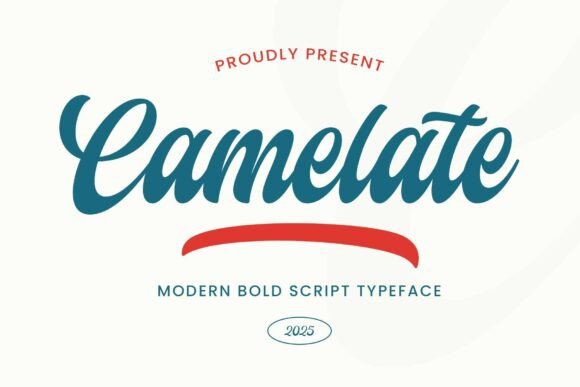
Camelate is a bold script font inspired by vintage logos and classic sign painting. It's carefully hand-drawn while maintaining calligraphic structure, blending a timeless feel with a modern and distinctive character. This makes it a perfect fit for digital branding that wants to evoke nostalgia without feeling outdated.
A Bold Choice for Hero Sections and Headlines
I quickly realized that Camelate shines brightest in display use—hero sections, landing page headlines, and call-to-action buttons. Its flowing curves and confident strokes add visual interest without overwhelming the viewer. When paired with a clean sans serif font like Montserrat or Lato for body text, it creates a balanced hierarchy that guides the user’s eye naturally through the page.
On mobile screens, Camelate maintains its legibility even at smaller sizes. I tested it on a responsive layout and found that it adapts well to different screen widths, making it ideal for websites that need to look great across all devices.
Styling Tips for Web Projects
When using Camelate in web design, I recommend experimenting with color contrast. It looks especially striking against dark backgrounds, but it also works beautifully on light tones when given enough spacing. For best results, avoid placing it over busy images—let the font be the star of the show.
Another thing to consider is the font weight. Camelate has a strong presence, so it's best used sparingly. Reserve it for short phrases, titles, and decorative accents rather than long paragraphs or dense blocks of text. This ensures that your website remains easy to read and visually appealing.
If you're working on an online shop, Camelate can elevate your product banners and category headers. It adds a touch of personality to your brand identity, helping to create a more memorable shopping experience. Just be sure to check the font's licensing terms before using it in commercial projects or client work.
What Works Well with Camelate?
Font pairing is crucial when using a script font like Camelate. I found that it pairs exceptionally well with minimalist sans serif fonts for body copy, creating a harmonious balance between elegance and simplicity. For a more editorial feel, a simple serif font like Merriweather or Playfair Display complements Camelate beautifully.
In a recent project for a coaching website, I used Camelate for the main headline and paired it with a clean sans serif for the subheadings and body text. The result was a professional yet approachable look that resonated well with the target audience.
For digital ads and promotional landing pages, Camelate brings a sense of exclusivity and craftsmanship. It's particularly effective for brands that want to convey a handmade or artisanal vibe. Whether it's a course sales page or a blog header, Camelate adds a layer of sophistication that can help boost engagement and trust.
When to Avoid Camelate
While Camelate is a versatile font, it's not suitable for every web design scenario. It's not ideal for small navigation text, form labels, or accessibility-heavy interfaces where readability is paramount. Long body copy or dense content areas should stick to more legible fonts to ensure a smooth user experience.
Also, if you're designing for a technical or data-driven platform, Camelate might not be the best choice. Its decorative nature can distract from the content rather than enhance it. Always test the font in context to make sure it serves the purpose of your design.
Before finalizing any project, double-check the font's included styles, alternates, ligatures, weights, and file formats. Make sure it supports the languages you need and that you have the appropriate commercial license for your intended use.
Camelate is a premium script font that brings a unique energy to digital design. Whether you're building a portfolio site, launching an online store, or redesigning a blog, it offers a stylish and professional option that can help elevate your brand's visual identity. With thoughtful pairing and strategic use, Camelate can become a powerful tool in your web design toolkit.